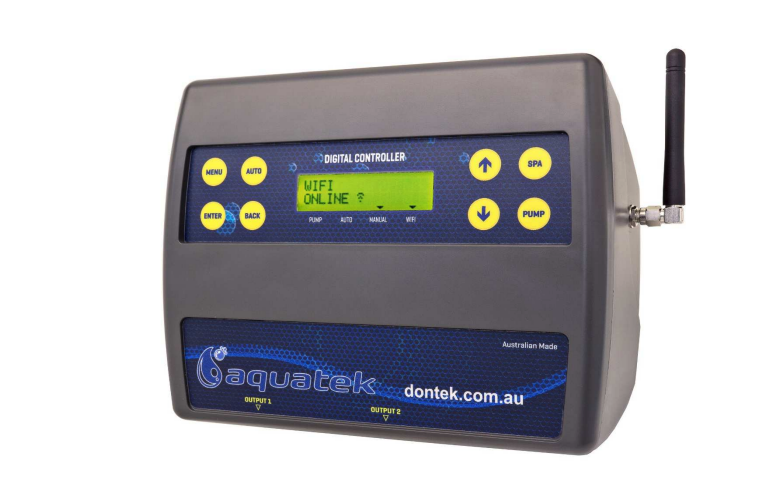
The AQUATEK Controller is an Australian-made smart pool automation system that manages your entire pool, spa and heating setup directly from your smartphone via WiFi. This modular control system handles everything from multi-speed pumps and sanitisers to heaters, solar systems, lighting and water features.
Key Features and Capabilities
The AQUATEK system offers comprehensive pool management through a single, WiFi-enabled controller. It can operate single or multi-speed pumps, control sanitisation equipment, manage various heating systems (solar, gas or heat pump), adjust pool and spa lighting, control water features, and automate pool/spa valve actuators.
System Specifications
| Feature | Master Controller | Expansion Unit 1 | Expansion Unit 2 |
| Power Sockets | 2 (9.9A / 2,370W combined) | 3 (10A or 15A model) | 3 (10A or 15A model) |
| Valve Outputs | 4 (24VA max each) | – | – |
| VF Contact | 1 | – | – |
| Sensor Inputs | 2 | – | – |
| Moisture Protection | IP33 | IP33 | IP33 |
| WiFi | 2.4GHz | – | – |
| Power Cable | 1.8m | 1.8m | 1.8m |
What sets AQUATEK apart is its modular design. The master controller includes two 240VAC power sockets, four valve actuator connections, and one voltage-free contact. You can expand the system with up to two additional expansion units, adding three more power sockets each (rated at either 10A or 15A), giving you control over up to eight powered devices.
Installation Requirements
Proper installation is crucial for optimal performance. Here are the key installation specifications:
| Requirement | Specification |
| Minimum distance from water | 3 metres |
| Minimum height above ground | 600mm |
| Power cable length | 1.8m |
| Power connection | Direct to GPO (no extension leads) |
| Moisture protection rating | IP33 |
| Recommended location | Out of direct weather |
| Chemical storage distance | Minimum 3 metres away |
| WiFi requirement | 2.4GHz network |
The controller should be mounted using the supplied bracket and wall plug kit, secured to a solid structure. Whilst the unit has an IP33 moisture protection rating, it should ideally be installed out of direct weather, similar to other pool equipment.
The 1.8-metre power cable must plug directly into a general power outlet, not an extension lead. The master controller’s two sockets have a combined maximum load of 9.9 amps at 2,370 watts.
Temperature Sensing and Monitoring
The system uses two temperature sensors for accurate monitoring:
Temperature Settings and Ranges
| Temperature Setting | Range | Default | Increment |
| Pool Temperature | OFF, 20°C to 40°C | 27°C | 1°C |
| Spa Temperature | OFF, 20°C to 40°C | 37°C | 1°C |
| Solar Temperature | OFF, 20°C to 40°C | 30°C | 1°C |
| Sensor Offset | -5.0°C to +5.0°C | 0.0°C | 0.5°C |
Sensor Installation
The pool sensor must be fitted upstream of the heater, preferably out of direct sunlight. Installation involves drilling a 14.5mm hole in the side of the PVC pipe and inserting the sensor with the supplied grommet.
If you have solar heating, a roof sensor should be fitted into a small piece of collector material away from the main collector but on the same aspect, preferably within 50cm of the roof gutter. Both sensors connect to ports beneath the controller, and you can designate which sensor is which through the installer menu.
Heating System Integration
AQUATEK supports three heating types with various configuration options:
Heating System Options
| Heating Type | Configuration Options | Key Features |
| Solar | None, Separate, Valve, Boosted | Winter mode, Priority setting, Start time control |
| Heat Pump | Filter, Independent, Independent with Sensor | Interlock control, Pump call function |
| Gas Heater | Filter, Independent, Independent with Sensor | Cool-down timer (0-59 mins), Interlock control |
Heating Installation Types
| Installation Type | Description | Sensor Requirement |
| Filter | Heater within filtration plumbing | Standard pool sensor |
| Independent | Separate circulation pump | Heater controls temperature |
| Independent with Sensor | Separate circulation but AQUATEK controls temp | Pool sensor before heater pump |
For heat pumps and gas heaters, the system uses a heater interlock cable that connects to interrupt the heater’s internal control. This interlock is for extra low-voltage switching only (maximum 24V at 1 amp). If your heater’s flow or pressure switch circuit is 240VAC, you’ll need an external relay kit installed by a licensed electrician.
For heat pumps equipped with “Demand Heat” function, the interlock cable connects to the heater’s “Pump Call” socket, allowing the heater to override the filter pump when flow is needed.
The system includes Solar Priority functionality, which maximises efficiency by only using the heat pump or gas heater when the roof temperature falls below a set minimum. This can significantly reduce heating costs whilst still maintaining your desired pool temperature.
Multi-Speed Pump Control
AQUATEK supports numerous multi-speed pump brands, each with specific connection requirements:
| Pump Brand | Communication Type | Speed Configuration |
| Theralux | Standard 3-speed | Pre-set speeds on pump |
| Theralux 485 | RS-485 | RPM adjustable (4 speeds) |
| Reltech | Standard 3-speed | Pre-set speeds on pump |
| Reltech 485 P | RS-485 | RPM adjustable (4 speeds) |
| Hayward 485 | RS-485 | RPM adjustable (4 speeds) |
| Pentair VS/F | External Control | Pre-set speeds (4 programs) |
| Pentair Enviromax 1500 | External Control | RPM adjustable (4 speeds) |
| Insnrg | External Control | RPM adjustable (4 speeds) |
| DAB E.Swim | 4-20mA | Percentage-based (4 speeds) |
| Henden | Standard 3-speed | RPM adjustable (4 speeds) |
| Speck | Standard 3-speed | Pre-set speeds on pump |
| Oasis V Series | RS-485 | RPM adjustable (4 speeds) |
For most pumps, you’ll need to disable the priming function and enable external control or 485 communication mode. The controller allows you to set up to four different pump speeds and assign different speeds to various operations such as filtration cycles, solar heating, spa mode and water features.
Equipment Allocation Options
The AQUATEK allows you to assign various types of equipment to each socket and valve output:
Power Socket Options
| Appliance Type | Function | Timer Control |
| Sanitiser | Follows filtration schedule | No (automatic) |
| Filter Pump | Primary circulation pump | No (filtration times) |
| Cleaning Pump | Additional cleaning system | Yes |
| Blower | Spa air blower | Spa mode only |
| Pool Light | Pool lighting control | Yes |
| Spa Light | Spa lighting control | Yes |
| Garden Light | Landscape lighting | Yes |
| Water Feature | Decorative water features | Yes |
| Solar Pump | Independent solar circulation | Solar schedule |
| Jet Pump | Spa jets | Spa mode only |
| Heating Pump | Independent heater circulation | Heating schedule |
| Always On | Continuously powered | No |
| Other | General-purpose output | Yes |
Valve Output Options
| Valve Type | Function | Control Method |
| Pool/Spa | Switches between pool and spa | Spa button |
| Solar | Directs water to solar panels | Solar heating active |
| Water Feature | Diverts water to features | Timer or manual |
| In Floor | In-floor cleaning system | Timer or manual |
| Feature from Solar | Water slide from solar pump | Manual only |
| Other | General-purpose valve | Timer or manual |
VF Contact Options
| Contact Type | Function |
| Gas Heater | Interlock for gas heating system |
| Heat Pump | Interlock for the heat pump system |
Each output can only be assigned one function, so careful planning of your equipment layout is important during installation.
Filtration and Timing Control
You can programme up to four separate filtration cycles per day, each with its own start time, end time and pump speed. This flexibility allows you to run the pump at higher speeds during peak swimming times and lower speeds during off-peak hours for efficient filtration.
For example, you might run Speed 4 from 8:00-9:00 for a quick clean, Speed 2 from 9:00-15:00 for standard filtration, and Speed 4 again from 15:00-16:00 before evening swimming. The sanitiser automatically follows these filtration times.
Spa Mode Operation
Pressing the SPA button initiates spa mode, which redirects water flow through pool/spa valves, primes the pump if needed, and begins heating to your preset spa temperature. You can configure optional spa equipment like blowers and jet pumps to activate at specific temperature points (within 10 degrees of your set spa temperature or always on).
The system includes a spa timeout function (adjustable from 1-24 hours, default 4 hours) that automatically returns to pool mode, preventing the spa from running continuously. This is particularly useful for rental properties.
Lighting Control
AQUATEK supports various pool light brands with colour-changing capabilities:
| Light Brand | Colour Options | Notes |
| AquaQuip | Multiple colours available | Full colour range |
| AquaQuip INS | Multiple colours available | Full colour range |
| Aquatight | Multiple colours available | Full colour range |
| Spa Electrics | Multiple colours available | Full colour range |
| Spa Electrics Multi Plus | Extended colour range | Enhanced options |
| Astral Pool | Multiple colours available | Full colour range |
| ModLite | Multiple colours available | Full colour range |
| Jandy | Multiple colours available | Full colour range |
| Single Colour (non-branded) | White only | No colour changing |
You can allocate up to three sockets to pool or spa lighting, with each socket controlling a light transformer and group of lights.
The system allows you to change colours through the menu or app. You can even set different colours for spa mode versus pool mode, so your spa lights automatically switch to your preferred colour when you activate spa mode.
WiFi Setup and App Control
The controller connects to your home WiFi network (2.4GHz) for smartphone control.
Supported WiFi Security Types
| Security Type | Supported | Notes |
| OPEN | Yes | Not recommended |
| WEP | Yes | Legacy protocol |
| WPA (WPA PSK) | Yes | Standard |
| WPA2 (WPA2 PSK) | Yes | Recommended |
| WPA/2 (WPA & WPA2 PSK) | Yes | Mixed mode |
| WPA2E (WPA2 Enterprise) | Yes | Business networks |
WiFi Signal Strength Guide
| Signal Strength | Quality |
| -30 dBm to -50 dBm | Excellent |
| -51 dBm to -70 dBm | Good |
| -71 dBm to -85 dBm | Fair |
| -86 dBm to -100 dBm | Poor |
The setup process involves searching for available networks, selecting yours, and entering the password using the controller’s button interface. The system displays WiFi signal strength in both percentage and dBm format, helping you assess connection quality.
If the connection is unreliable, you may need to install a WiFi range extender near the controller or use an antenna extension kit (available in 1-metre or 3-metre lengths) if the controller is mounted below ground level or inside a shed.
Heat Demand and Energy Management
The Heat Demand feature lets you define specific timeframes when heating is allowed (for example, 6:00 AM to 10:00 PM). During these times, the system will maintain your desired pool temperature. Outside these hours, heating stops, saving energy.
You can also enable “Run Until Heated” mode, which overrides filter cycle times and continues heating until the target temperature is reached. This is useful when you want the pool heated quickly for an event, though it may mean extended pump and heater runtime.
Maintenance and Manual Control
The PUMP button provides manual override functions for maintenance tasks:
Manual Pump Control Options
| Function | Duration Options | Use Case |
| Backwash | 3 minutes (fixed) | System backwash |
| Pump ON | 30 mins, 1hr, 2hr, 3hr, 5hr, 9hr, 10hr, 15hr, 20hr, 24hr | Vacuuming, chemical addition, extended run |
| Pump OFF | 1hr, 2hr, 3hr, 5hr, 9hr, 10hr, 15hr, 20hr, 24hr | Maintenance, repairs, service |
During the countdown, pressing ENTER resets the timer to start again. Pressing PUMP returns to automatic operation.
The CONTROL menu allows you to manually override any allocated socket or valve, switching between AUTO, ON and OFF modes. This gives you quick access to test equipment or operate features outside their normal schedules.
Valve Automation
The controller includes four valve actuator connections (maximum power 24VA) for automating pool/spa changeover, solar heating, water features and in-floor cleaning systems. The system will only turn two valves simultaneously, with a 40-second delay before activating a third or fourth valve to prevent electrical overload.
Important Safety and Warranty Information
Warranty Coverage
| Component | Warranty Period | Conditions |
| Controller & Electronics | 3 years | Against component failure or faulty workmanship |
| Valves & Actuators | 12 months | At the manufacturer’s discretion |
| Labour & Travel | Not covered | Return to base warranty |
Warranty Exclusions
The warranty may be voided by:
- Misuse or incorrect installation
- Power surges or lightning strikes
- Corrosion from pool chemical fumes
- Installation not following the manufacturer’s instructions
Safety Requirements
| Safety Item | Requirement |
| Chemical storage distance | Minimum 3 metres from the controller |
| Supervision | Children must be supervised around the appliance |
| Damaged power cord | Return to the supplier, do not use |
| Installation | Follow all manufacturer guidelines |
Store pool chemicals at least 3 metres away from all pool equipment, as chemical fumes can cause corrosion that voids the warranty.
Expansion Capabilities
When adding expansion units, timing is important during initial setup. Turn on the master controller first, wait for it to start, then turn on Expansion Unit 1. Wait 20 seconds before turning on Expansion Unit 2. This ensures proper address assignment. The master controller automatically detects connected expansion units during the first two minutes of startup.
Summary
The AQUATEK Controller offers professional-grade pool automation at a manageable complexity level. Its modular design means you can start with a basic pump and heating control, then expand as needed. The WiFi connectivity and smartphone app provide convenient remote access, whilst the physical controls ensure you’re never locked out if the network is unavailable.
For Australian pool owners seeking comprehensive automation with flexibility to grow, AQUATEK represents a locally-made solution backed by Dontek Electronics’ manufacturing expertise. Proper installation following the guidelines above will ensure reliable operation and maximum enjoyment of your pool and spa.